Understanding ETags and Their Role in Efficient Caching
August 5, 2023 2:07 PM
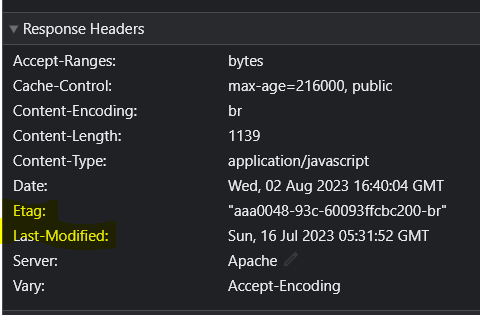
When browsing the internet, you've likely encountered web pages that load faster and feel more responsive. This seamless experience is often the result of caching, a technique that stores and reuses previously fetched resources. ETags, or Entity Tags, play a vital role in optimizing caching, allowing browsers to serve your content more efficiently. Let's explore what ETags are and how they contribute to a smoother browsing experience.
What are ETags?
In the world of web development, an ETag is a unique identifier assigned to a specific version of a resource, such as an image, stylesheet, or document, by a web server. Think of it as a digital fingerprint for a file's content. Whenever a client requests a resource from a server, the server generates an ETag based on that resource's current state. This ETag is sent back to the client along with the resource.
How ETags Help with Caching
Caching is like creating a local copy of a web resource to avoid repeatedly fetching it from the server. ETags enhance caching by enabling browsers to make smarter decisions about when to use cached content and when to request fresh data.
Here's how ETags contribute to efficient caching:
Conditional Requests: When a client caches a resource along with its associated ETag, it can later send the ETag back to the server with a request for the same resource. This is known as a conditional request. The server checks if the ETag matches the current version of the resource. If they match, the server responds with a lightweight "Not Modified" status (HTTP 304) and doesn't send the resource again. The client uses its cached version, saving bandwidth and reducing latency.
Reduced Data Transfer: ETags minimize data transfer between the client and the server. If the ETag indicates that the cached resource is still valid, the server doesn't need to send the entire content again. Only the headers need to be exchanged, resulting in quicker page loads and a more responsive user experience.
Resource Consistency: ETags help manage the consistency of resources across clients. When a resource is modified, its ETag changes. Clients with outdated ETags are aware that the resource has changed and can fetch the updated version. This ensures that users always see the latest content while still benefiting from cached resources when applicable.
Implementing ETags Effectively
For web developers and server administrators, implementing ETags effectively involves generating them based on resource content, updating them when resources change, and ensuring proper handling of conditional requests. ETags can work in conjunction with other caching mechanisms, such as Cache-Control and Last-Modified headers, to provide a comprehensive caching strategy.
In conclusion, ETags are an essential tool in the world of web caching. They provide a way to uniquely identify versions of resources and enable browsers to optimize data retrieval. By reducing unnecessary data transfer, minimizing latency, and ensuring resource consistency, ETags contribute significantly to a smoother, faster, and more enjoyable browsing experience for users around the globe. As websites continue to evolve, ETags will remain a valuable asset in the arsenal of web performance optimization techniques.
For example, a response header might look like this:
HTTP/1.1 200 OK
ETag: "12345"
Content-Type: image/jpeg
Content-Length: 12345
In this example, the ETag value is "12345."
- Client Storage: The client (browser) stores the received ETag. This stored ETag is then sent back to the server in subsequent requests for the same resource.
When the client makes subsequent requests for the same resource, it includes the stored ETag in the If-None-Match header. The server compares the provided ETag with the current ETag of the resource. If they match, the server responds with a "Not Modified" status (HTTP 304), indicating that the client's cached version is up to date.
If the ETags do not match, the server understands that the resource has been modified since the client's cached version. It then sends the updated resource along with a new ETag.
Comments